WordPress 5.0 – Codename Bebo (for Cuban pianist Bebo Valdés) was released the day before yesterday. With many changes in WordPress Core, the new editor — Gutenberg — replaced the old classic TinyMCE editor, which is an excellent move towards easier editing.
Yesterday I upgraded my websites and clients’ websites to WP 5.0. With no hassle, everything seems to be working fine for me. But I found some distress among users about the change in interface, which is a widespread resistance-to-change behaviour. I also saw some developers spreading rumours about Gutenberg breaking your website. So here’s my Survival Kit for those who feel they can’t upgrade to 5.0.
The following methods are for a safe transition to WordPress 5.0.
1. Install a Classic Editor Plugin
This plugin brings back the TinyMCE editor to your latest version of WordPress.
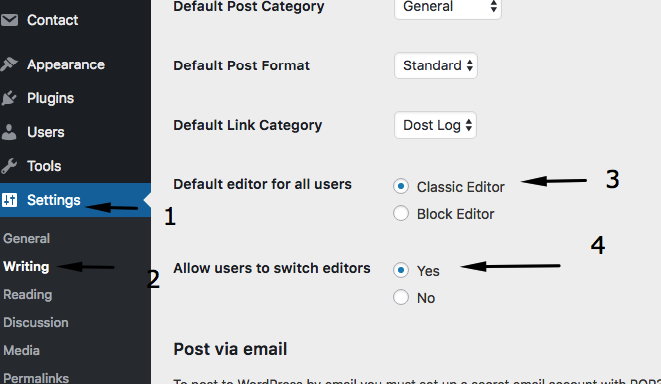
2. Update the WordPress Settings to use the classic editor and don’t allow any of your users to switch to Gutenberg. Settings are available in Dashboard Left Menu > Settings Section > Writing.
3. Install another plugin: Fatal Error Notify
This one will notify you if you have any errors on your website. Once you update to 5.0, this plugin will keep track of upcoming errors. Don’t forget to enter your email address in this plugin’s notification section.
WordPress releases are not just about features; they also come with many security and bug fixes. If you are one of those not upgrading to WordPress 5.0 out of fear that Gutenberg is going to break your site, you are leaving yourself vulnerable.
With the above three things, you can continue your WordPress journey without worry. Let your developer think about what mess they’ve built that is not compatible with the latest release.
Happy WordPressing 🙂